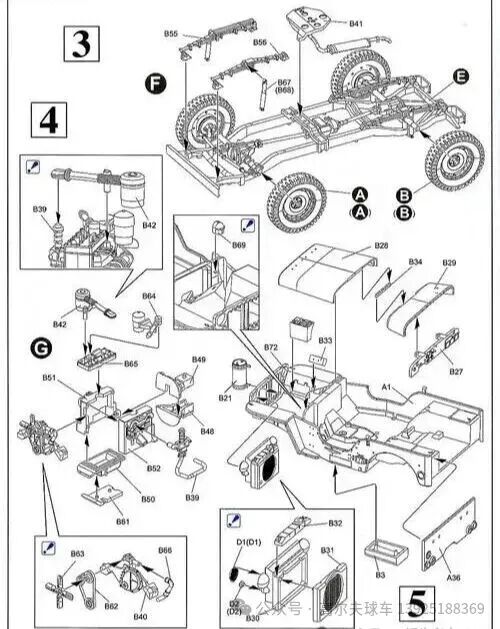
I. Core Reading Logic
1. Look at the sections first, then the numbers.
The exploded view is divided into areas by functional modules (such as chassis area, power area, suspension area). The numbered sections in the diagram (such as 3, 4, 5) correspond to different modules. First, determine which module the part you are looking for belongs to, to narrow down the search range.
2. Numbers correspond to parts one-to-one.
Each part in the diagram has a unique alphanumeric code (such as B41, B55). This must be used in conjunction with the corresponding “Parts List (BOM)”. The parts list will indicate the part name, specifications, material, and quantity corresponding to the code.
3. Lines represent assembly relationships.
The lines between parts indicate the installation and connection method. Solid lines usually represent direct assembly, while dashed lines may represent related components. Following the lines can help clarify the disassembly and assembly sequence of the parts.
II. Three Steps to Quickly Find Parts
1. Clarify your needs.
Determine whether you are looking for “repair and replacement parts” or “modification and upgrade parts.” For example, if you need to replace a shock absorber, first determine that it belongs to the suspension module.
2. Locate the module and number.
Find the section of the suspension module in the exploded view, find the part number corresponding to the shock absorber, and record it.
3. Check the parts list to confirm the information.
Refer to the BOM table to find the specific model, applicable vehicle model, and purchase specifications of the shock absorber based on the number, to avoid buying the wrong parts.
III. Practical Tips
1. The perspective of the exploded view (top view/side view/bottom view) will affect the judgment of the part position. Prioritize looking at the perspective indicated in the drawing title block.
2. Complex parts (such as motors, controllers) will have separate enlarged exploded views, which can be found in the drawing attachments.
3. For parts marked with arrows, the arrow direction is usually the assembly reference direction. When disassembling, you can operate in the reverse direction.
Do you need a corresponding query template for the exploded view and BOM table to easily fill in the numbers and find the parts?